Muzter shift texts
Last updated October 13, 2026
Muzter is a crew scheduling tool operated by BuzzAhh, Inc. Employers use it to send work schedules to their own crew. A crew member can choose to get their shifts by text as well as by email. This page describes that text program: who sends it, what it sends, and how people sign up and stop.
What the texts are
Texts about shifts a crew member has been offered or scheduled for by their employer:
- a new shift or a new week of shifts, with a link to confirm or decline
- a reminder before a shift starts
- a nudge when a shift is still waiting for an answer
- an open shift they can claim
Every text starts with Muzter by BuzzAhh and the employer it is for, and ends with how to stop. There is no marketing in this program. Message frequency varies with how many shifts the employer schedules.
How people sign up
Only the crew member can turn texts on. An employer cannot do it for them.
- An employer adds a crew member to Muzter by name, mobile number and email, and may invite them to get texts. That invitation is sent by email. No text is sent.
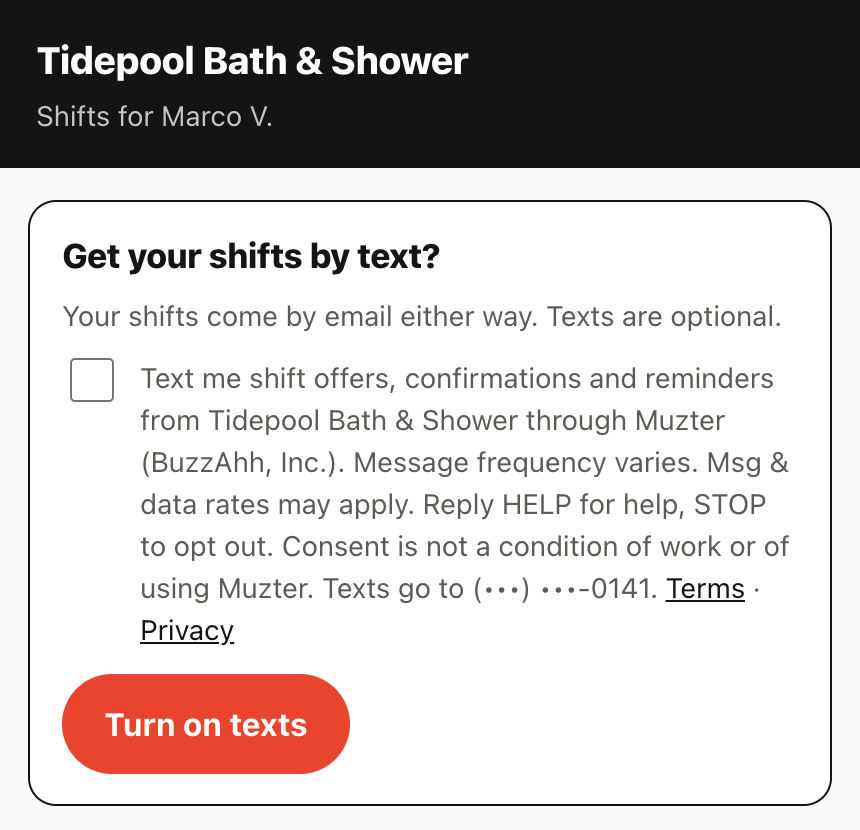
- The crew member opens their own schedule page from that email. Texts are off. The page shows an
unchecked box with this wording beside it:
Text me shift offers, confirmations and reminders from [Company] through Muzter (BuzzAhh, Inc.). Message frequency varies. Msg & data rates may apply. Reply HELP for help, STOP to opt out. Consent is not a condition of work or of using Muzter. Texts go to (•••) •••-1234. Terms · Privacy
[ Turn on texts ] - If they tick the box and press Turn on texts, Muzter records the time, the address it came
from and the exact wording they agreed to, and sends one confirmation text:
Muzter by BuzzAhh: You're signed up for shift texts from [Company]. Msg frequency varies. Msg & data rates may apply. Reply HELP for help, STOP to opt out.
Anyone who does not opt in still gets every shift by email. Here is the opt-in on a crew member's schedule page:
Sample messages
Stopping, and getting help
- Reply STOP to any text to stop all Muzter texts to that number. You'll get one reply confirming it, and nothing after that. Your shifts keep coming by email.
- Reply START to turn texts back on after stopping.
- Reply HELP for help, or email muzter@buzzahh.com.
- You can also turn texts off on your schedule page at any time.
Message and data rates may apply. Carriers are not liable for delayed or undelivered messages. We do not sell or share your SMS opt-in data or personal information with third parties for marketing purposes. See the Privacy Policy and the SMS Terms in the Terms of Service.